🧠 Autonomous Research Agent (LangGraph AI)
An advanced AI agent built with LangGraph (LangChain 1.0+) that can autonomously reason, plan, execute tools, and synthesize complex, real-time answers.

This project is an autonomous AI Research Assistant built using LangChain 1.0+, LangGraph, and Streamlit.
Unlike a standard RAG (Retrieval-Augmented Generation) system that only answers questions based on static documents, this agent can:
- Reason: Autonomously understand complex, multi-step user queries.
- Plan: Break down the problem into a sequence of required actions.
- Act: Use external tools (like live web search) to gather dynamic, real-time data.
- Synthesize: Combine all the gathered information to provide a comprehensive, final answer.
The agent is deployed with an interactive Streamlit UI and includes a simple rate-limiting feature (4 questions per session) to manage API costs.
🎥 Live Demo (Example Interaction)
User: “What company has a higher market cap right now, NVIDIA or Apple? And what’s the difference in US dollars?”
Agent: (Thinking…)
-
[Action: tavily_search(query="NVIDIA market cap")]-> Finds $4.8T -
[Action: tavily_search(query="Apple market cap")]-> Finds $3.9T [Synthesizing]- (Final Answer) “Currently, NVIDIA has a higher market cap at approximately $4.8 trillion, which is about $900 billion more than Apple’s $3.9 trillion.”
🏛️ Core Architecture (How it Works)
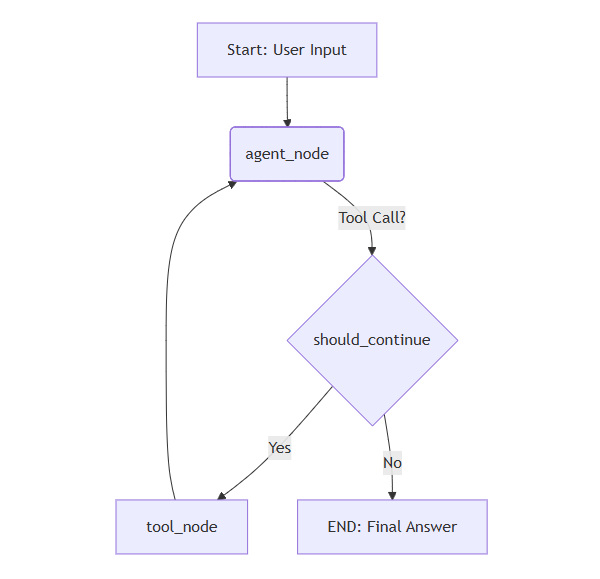
This project uses LangGraph to define the agent’s logic as a “state machine” or graph. This is the modern replacement for the older AgentExecutor class and allows for complex, cyclical, and stateful reasoning.
The graph consists of:
- AgentState: A simple dictionary (
TypedDict) that defines the “memory” or “state” of our graph. It primarily tracks the list of messages. - Nodes:
-
agent_node: The “brain” of the operation. It calls the LLM (gpt-4o-mini) to decide what to do next (call a tool or generate a final answer). -
tool_node: The “action”. This is a prebuiltToolNodethat executes any tool calls requested by theagent_node(e.g., performs the Tavily search).
-
- Conditional Edges:
- The
should_continuefunction acts as the router. After theagent_noderuns, this edge checks if the LLM requested a tool. - If YES (tool call exists): The graph routes to the
tool_node. - If NO (no tool call): The graph routes to
END, and the agent provides its final answer.
- The
This cyclical flow (agent -> call_tool -> agent -> END) allows the agent to call tools multiple times, reflect on the results, and solve complex problems.
✨ Features
-
Autonomous Reasoning: Built with
LangGraphfor a robust “Reason -> Act -> Observe” loop. The agent decides for itself when to search vs. when to answer. -
Dynamic Tool Use: Integrated with
TavilySearchfor real-time financial data, market caps, and simple math calculations. -
Interactive UI: A clean, chat-based interface built with
Streamlit. -
Cost Control (Rate Limiting): Includes a
Streamlitsession state counter to limit users to 4 questions, preventing API key abuse. -
Modern Tech Stack: Built on the latest
langchain 1.0+libraries (langchain-core,langchain-openai,langgraph) and a cost-effective, powerful LLM (gpt-4o-mini).
🛠️ Tech Stack
-
Language: Python 3.11+
-
Agent Framework: LangChain 1.0+
-
Reasoning Engine: LangGraph
-
LLM (Brain): OpenAI
gpt-4o-mini(recommended for cost/performance) orgpt-4o -
Tools: TavilySearch (Live Web Search)
-
Interface (UI): Streamlit
-
Environment Management:
python-dotenv
🚀 Setup and Installation
1. Clone the Repository:
git clone https://github.com/faridkazimov/ai-research-agent
cd ai-research-agent
2. Create and Activate a Virtual Environment:
python -m venv ajan-env
# On Windows
.\ajan-env\Scripts\activate
# On macOS/Linux
source ajan-env/bin/activate
3. Install Dependencies:
pip install -r requirements.txt
4. Create Your .env File: In the root of the project, create a file named .env and add your secret API keys:
OPENAI_API_KEY="sk-..."
TAVILY_API_KEY="tvly-..."
5. Run the Streamlit App:
streamlit run agent_app.py
Your browser will automatically open to the app’s local URL (usually http://localhost:8501).
🗺️ Future Roadmap & Advanced Implementation
1. Add Conversational Memory
-
The Challenge: The agent is currently stateless. If you ask “What is NVIDIA’s market cap?” and then “What about Apple’s?”, it won’t remember you were comparing companies.
-
The Solution (
LangGraph): TheAgentStateis already built for memory! Themessages: Annotated[Sequence[BaseMessage], operator.add]line ensures that messages are added to the state, not replaced. The only change needed is in the Streamlit UI code:-
Store the actual
BaseMessageobjects (likeHumanMessage,AIMessage) inst.session_state["messages"], not just dictionaries. -
When calling the agent, pass the entire history:
inputs = {"messages": st.session_state.messages}. This will send the full conversation context to the LLM on every turn, allowing it to remember the past.
-
2. Add Custom Tools (e.g., RAG Tool)
-
The Challenge: The agent can only search the public web. It knows nothing about my private documents.
-
The Solution (
@tooldecorator): We can create a new tool for the agent by simply decorating a Python function.
Example:
from langchain_core.tools import tool

# (Assuming you have a RAG function from another project)
def my_rag_retriever(query: str) -> str:
    """Use this to find information in private company documents or PDFs."""
    # ... your RAG retrieval logic here ...
    docs = vectorstore.similarity_search(query)
    return " ".join([doc.page_content for doc in docs])

@tool
def rag_search_tool(query: str) -> str:
    """Searches private company documents for specific information."""
    return my_rag_retriever(query)

# Then, just add it to the 'tools' list in agent_app.py:
tools = [search_tool, rag_search_tool]
The agent will now autonomously choose between searching the web (TavilySearch) or your private documents (rag_search_tool) based on the user’s question.
3. Add Human-in-the-Loop (Approval Step)
-
The Challenge: The agent acts autonomously. What if it decides to call a very expensive tool or perform a dangerous action (like deleting a file, if we gave it that tool)?
-
The Solution (
LangGraphEdges): We can add a “pause” button to the graph.-
Modify the should_continue function to return a third string,
"human_approval", instead of"call_tool"if the tool is sensitive. -
Add a new node (
workflow.add_node("human_approval", human_approval_node)) and a new conditional edge. -
This new node would pause the graph. In Streamlit, the app would show “[Yes] / [No]” buttons. If the user clicks “Yes”, the app would
resumethe graph execution, which would then proceed to thetool_node.
-
4. Implement True Response Streaming (Word-by-Word)
-
The Challenge: The UI shows a “Thinking…” spinner and dumps the whole answer at once. This feels slow and less interactive than ChatGPT.
-
The Solution (
app.stream()+st.write_stream()):-
Instead of using
final_state = app.invoke(inputs)in the Streamlit code… -
We will use
response_stream = app.stream(inputs, stream_mode="values"). -
We then iterate over this
response_streamand use Streamlit’s built-inst.write_stream()function. This will render the agent’s final answer (from the lastagent_nodestep) word-by-word as it’s being generated by the LLM.
-